Instagram Profile Picture Size: 360 x 360 Pixels
The right Instagram profile picture size is 360 x 360 pixels, a square image centered for the app's automatic circle crop. Here's how to get it right.

Contents
- The Correct Instagram Profile Picture Size
- Mastering the Automatic Circle Crop
- Design Principles for a Standout Profile Picture
- Headshot vs. Logo: What to Choose?
- Use High Contrast and Bold Backgrounds
- Keep It Simple and Recognizable
- A Quick Guide to Other Instagram Image Sizes
- How to Prepare and Upload Your Perfect Profile Picture
- FAQ
- What is the best resolution for an Instagram profile picture?
- Should I use a logo or my face for my business’s Instagram?
- How do I prevent my Instagram profile picture from being blurry?
- Can I use a rectangular photo for my Instagram profile?
The right size for an Instagram profile picture is 360 x 360 pixels, a square (1:1) image with your face or logo centered. Instagram shows it on-screen at just 110 x 110 pixels, but the bigger upload gives its compression enough detail to work with, so the photo stays sharp on high-res phones and desktops instead of turning soft and pixelated.
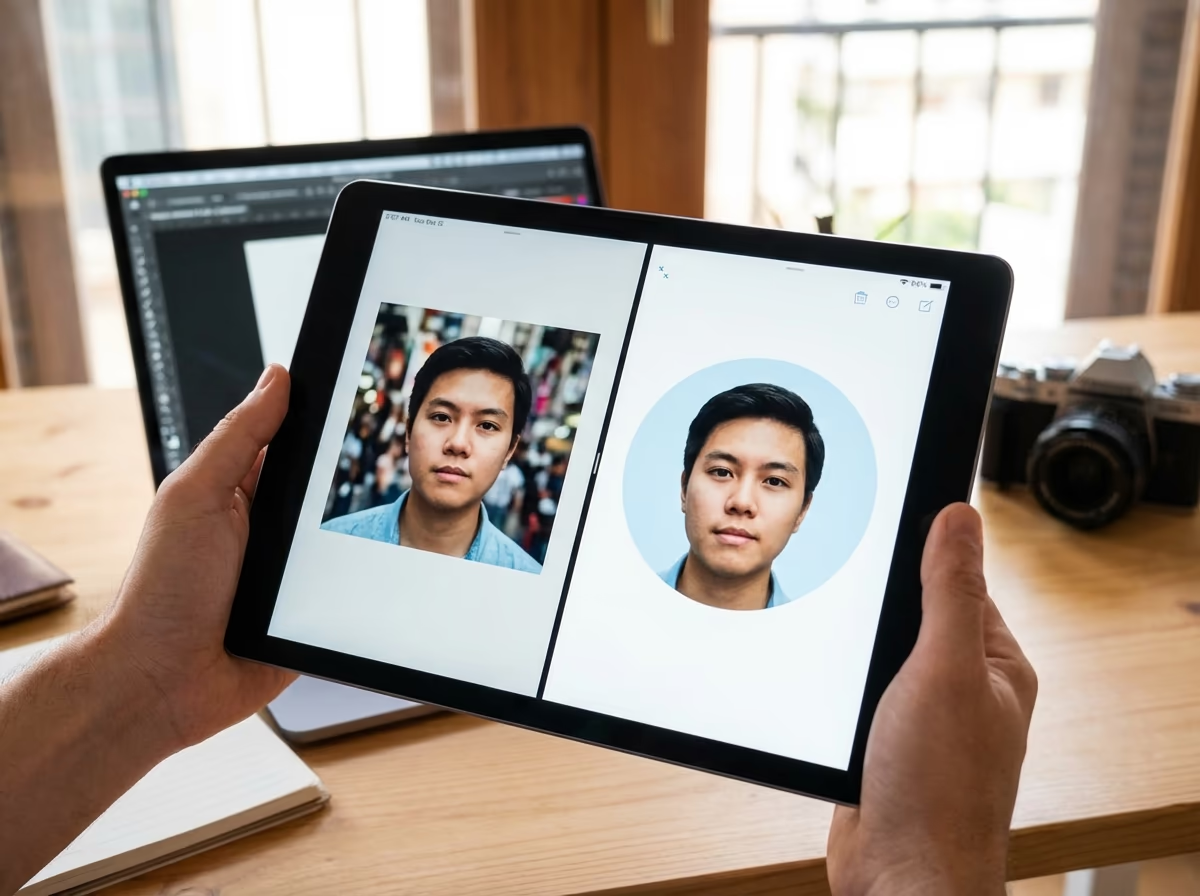
Instagram also masks every profile photo into a circle, which is why centering the subject matters as much as the pixel count. Run the square through our circle crop preview tool before you upload. It shows you exactly what survives the mask and what gets cut.
The Correct Instagram Profile Picture Size
Uploading the 110 x 110 display size directly is the mistake that causes most of the blur complaints: Instagram’s compression needs more source data than that to work with, not less. A 360 x 360 pixel square gives it enough room, and it holds up across Stories, comments and the profile grid alike.
If you’re building a brand kit and expect to reuse the file elsewhere (a website header, a press kit), start even bigger: 1080 x 1080 pixels downsizes cleanly to whatever Instagram needs, while a 360 x 360 original won’t scale back up without going soft.
Mastering the Automatic Circle Crop
Instagram crops every profile picture into a circle. That’s not optional, so the square you upload has to be designed for it, not just technically correct. Put the focal point, a face or a logo mark, dead center.
A circle inscribed inside your square photo marks the safe zone: everything outside it disappears in the crop. Nudge your subject toward a corner and Instagram will cut it, even though the full square looked fine in your editor. You can use an online circle crop tool to preview exactly how your square image will look once Instagram applies the mask, then adjust the framing before you upload anything. For more on getting this right, see how to circle crop an image online.
A great Instagram profile picture keeps the subject centered in the square, because the platform’s circular crop hides everything outside that center circle.
Design Principles for a Standout Profile Picture
Size is only half the job. At thumbnail scale, in the Stories bar or next to a comment, a profile picture also has to read instantly, and that comes down to a few design choices.
Headshot vs. Logo: What to Choose?
The right call depends on your brand. Personal brands (coaches, artists, influencers, freelancers) do better with a headshot: it’s well-lit, shows your face clearly, and builds a connection a logo can’t. Well-lit and in focus does more for trust than a polished edit.
Businesses, e-commerce stores and agencies are usually better off with a logo, since it reinforces brand recognition at a glance. Keep it bold and simple. Fine text or intricate details just turn into noise once Instagram shrinks it down.
Use High Contrast and Bold Backgrounds
Your profile picture competes with everything else in a crowded feed, so contrast does real work here. A light-colored logo on a dark background, or a bright outfit against a neutral one, reads faster than a busy or cluttered scene. If your brand colors are blue and white, a crisp white logo on a solid blue background is about as simple as it gets, and it works.
Got a great headshot with a distracting background? Run it through our free background remover and drop the portrait onto a clean, brand-aligned color instead.
Keep It Simple and Recognizable
At thumbnail size, complex scenes and full-body shots blur into noise. Simplicity matters more here than in almost any other image you’ll post: a close-up headshot or a bold, simplified logo reads instantly where a detailed one doesn’t. Zoom your draft down to thumbnail size before you commit. If you can still tell what it is at that size, you have a winner.
A Quick Guide to Other Instagram Image Sizes
Your profile picture isn’t the only size that matters for a clean-looking feed. Here’s how Instagram’s other formats break down, so nothing gets stretched or cropped by accident. The same logic feeds into a good image SEO strategy for the rest of your site.
| Format | Dimensions | Aspect ratio |
|---|---|---|
| Square posts | 1080 x 1080 px | 1:1 |
| Portrait posts | 1080 x 1350 px | 4:5 |
| Landscape posts | 1080 x 566 px | 1.91:1 |
| Stories | 1080 x 1920 px | 9:16 |
How to Prepare and Upload Your Perfect Profile Picture
- Select a high-resolution image: start with the sharpest photo or logo file you have. A soft source never gets sharper downstream.
- Crop to a square: 1:1 aspect ratio, at least 360 x 360 pixels, or go up to 1080 x 1080 if you want a file you can reuse elsewhere.
- Center your subject: face or logo in the middle, with a generous margin around the edges so nothing critical sits near the corners the circle crop will hide.
- Save and upload: JPEG or PNG both work. In Instagram, go to Edit Profile, tap Change Profile Photo, and upload the file.
- Review on mobile: check the result on your profile page, in a comment you leave, and in the Stories bar at the top of the app. That’s the fastest way to catch a bad crop before anyone else sees it.
Get the square and the centering right, and everything else, background, contrast, logo size, is a design choice rather than a technical fix.
FAQ
What is the best resolution for an Instagram profile picture?
Upload a square image at 360 x 360 pixels. The display size is smaller, but the extra resolution is what keeps Instagram’s compression from leaving the photo blurry or pixelated.
Should I use a logo or my face for my business’s Instagram?
Use a logo to build brand recognition for a company or store. If you’re a personal brand, a coach, consultant or artist, a professional headshot builds a connection a logo can’t.
How do I prevent my Instagram profile picture from being blurry?
Start with a sharp source image and upload it at 360 x 360 pixels. That gives Instagram’s compression enough data to preserve, instead of forcing it to guess.
Can I use a rectangular photo for my Instagram profile?
No. Instagram forces a square (1:1) crop on upload, then applies the circular mask automatically on top of it.


