Reddit Profile Picture Guide 2026: Sharp in the Tiny Circle
Reddit draws your profile picture at 32 px in comment threads. Get the real size specs, the circle-safe crop math, and measured exports that stay sharp.

Contents
Upload a square image, at least 512×512 pixels, saved as PNG or JPEG under 500 KB. That clears every Reddit profile picture size spec in circulation, because the guides publishing them genuinely disagree. Reddit masks the square into a circle and draws it as small as 32 pixels in comment threads, so center the subject and treat the corners as disposable. Frame for the smallest render, not the profile page.
Reddit profile picture size, reconciled
I pulled four current spec guides while researching this post, and no two of them tell the same story. MediaSizes asks for a 256×256 minimum, recommends 512 or larger, and caps the file at 500 KB. PictureSizes lets the minimum fall to 128×128 and claims a 5 MB ceiling. SocialEZ and DoodleFairy both settle on 256 as the working floor, with DoodleFairy nudging you toward 400×400 or larger. Same platform, same month, four different answers.
The parts they agree on are solid, and the parts they fight over have an easy strictest-safe reading:
| Spec | The consensus | The disagreement | Safe call |
|---|---|---|---|
| Aspect ratio | 1:1 square, displayed as a circle | none | build square |
| Recommended size | 256×256 works everywhere | 256 vs 400 vs 512+ | keep a 512×512 master |
| Minimum size | small squares accepted | 128 px on one guide, 256 on two | never go below 256 |
| Format | PNG or JPEG | none | PNG for logos, JPEG for photos |
| File cap | a cap exists | 500 KB vs 5 MB | stay under 500 KB |
| Animation | static only for custom uploads | none | export a static file |
A 512 square under 500 KB passes every version of that table (which is why it’s the only number I bother remembering). Two adjacent specs, for the moderators reading: subreddit community icons run 256×256 with the same 500 KB figure, and your profile banner is a separate 1200×400 asset at 3:1 with a 5 MB allowance.
Native square crop first
You don’t need a new tool to get the square. iPhone Photos hides a Square preset behind Edit and Crop, and the Photos app on Windows offers fixed aspect ratios in its crop panel. Cut the square there, keep your subject centered, and you’ve done most of the prep with software already on the device. The full tap path lives in our circle crop on iPhone walkthrough.
The drawback is what the preview shows you. A square preview is a rectangle with equal sides; it says nothing about the circle Reddit will punch out of it. Whatever sits near a corner looks fine on your phone and then vanishes on the site, and nothing warns you until the avatar is live.
A circle-true workflow in the browser
Previewing the actual circle is the whole reason I use a circle crop tool instead of eyeballing it. You drop the photo, drag the round mask until nothing important touches the edge, and export a square PNG that matches what the mask showed you. RoundCut runs the crop in your browser tab, so the photo never uploads to a server, which matters when the avatar is your face.
Size comes next. If the source is a 4,000-pixel phone photo, run it through RoundCut Resize at 512 before upload so Reddit’s own downscaler has less work to do.
Numbers beat adjectives here, so I measured the whole ladder this week with our pipeline: one 1536×1536 center crop, resampled to each size Reddit renders, exported twice. The 256×256 PNG came out at 143.5 KB and the JPEG at quality 85 at 23.0 KB. Both clear the strict 500 KB reading with room to spare. At the bottom of the ladder, the 32×32 PNG weighed 2.6 KB.
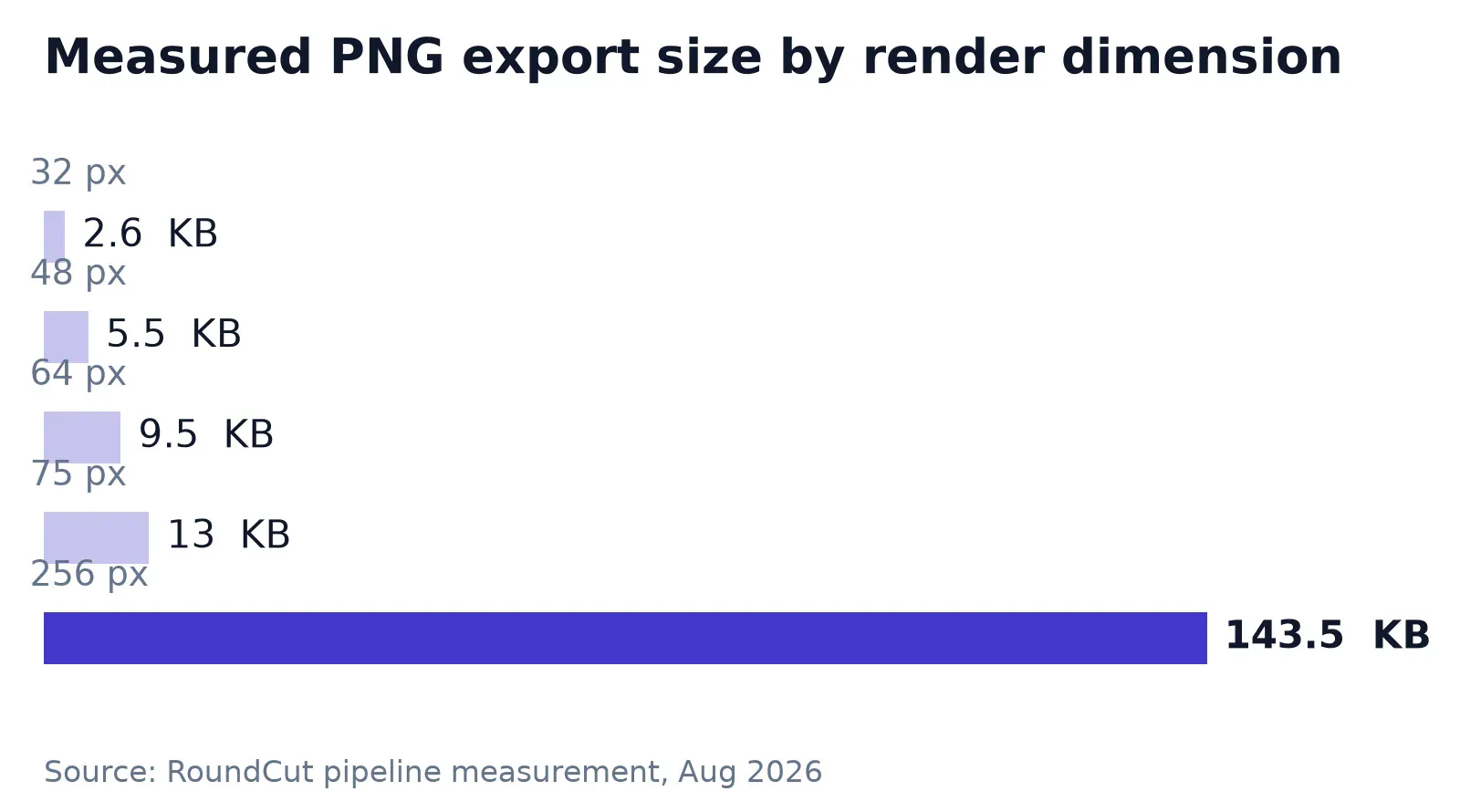
Flat-color logos behave differently: PNG keeps their edges clean but pays for it in bytes at larger canvases. When an export creeps toward the cap, RoundCut Compress pulls it back under before upload, in the browser like the rest.
Where the avatar actually renders
DoodleFairy is the one guide that publishes the display ladder, and it reframes the whole exercise:
| Where it shows | Drawn at |
|---|---|
| Rows in a comment thread | 32 px |
| Hover cards on awards | 48 px |
| About panel in the sidebar | 64 px |
| Listings in the feed | 75 px |
| Your own profile page | 256 px |
Run the arithmetic on the top row. A 32×32 render keeps 1/64 of a 256×256 upload’s pixels, or 1.5625 percent. Reddit throws away more than 98 percent of the image you so carefully prepared, every time someone reads your comment. And comments are where an account lives; people scroll your replies daily and open your actual profile page rarely.
Faces shrink faster than you’d guess. A face filling 60 percent of the frame height stands 19 pixels tall in a comment row. Eyes, glasses, a beard: each becomes a couple of pixels, and fine texture is gone entirely. That’s why high contrast between subject and background does more for recognition than any resolution bump.
Small renders sit behind a lot of “my avatar got worse after upload” complaints, on Reddit and elsewhere. Telegram, for instance, stores your profile photo as small re-encoded copies, which is why the fix in our blurry Telegram profile photo post starts with the source file, not the app.
Bluesky readers hit the identical geometry from another direction; the Bluesky profile picture guide applies the same small-circle logic to a different ladder.
Circle math: 70% is the honest safe zone
Spec guides repeat a center-80% rule: keep everything important inside the middle 80 percent of the square and the circle won’t bite it. For faces, fair enough. For logos, the number is wrong, and the geometry says so.
A circular mask over a square keeps π/4 of the pixels, about 78.5 percent, so 21.5 percent of your upload dies at the corners before anyone sees it. The largest square that fits entirely inside the circle has sides of 70.7 percent of the canvas width. On a 256-pixel avatar that’s a 181-pixel box. An 80-percent box overshoots it: its half-diagonal runs 0.566 of the width against a circle radius of 0.5 (which pushes the box corners past the mask). A face won’t miss those slivers. A wordmark whose corner carries a letter will.
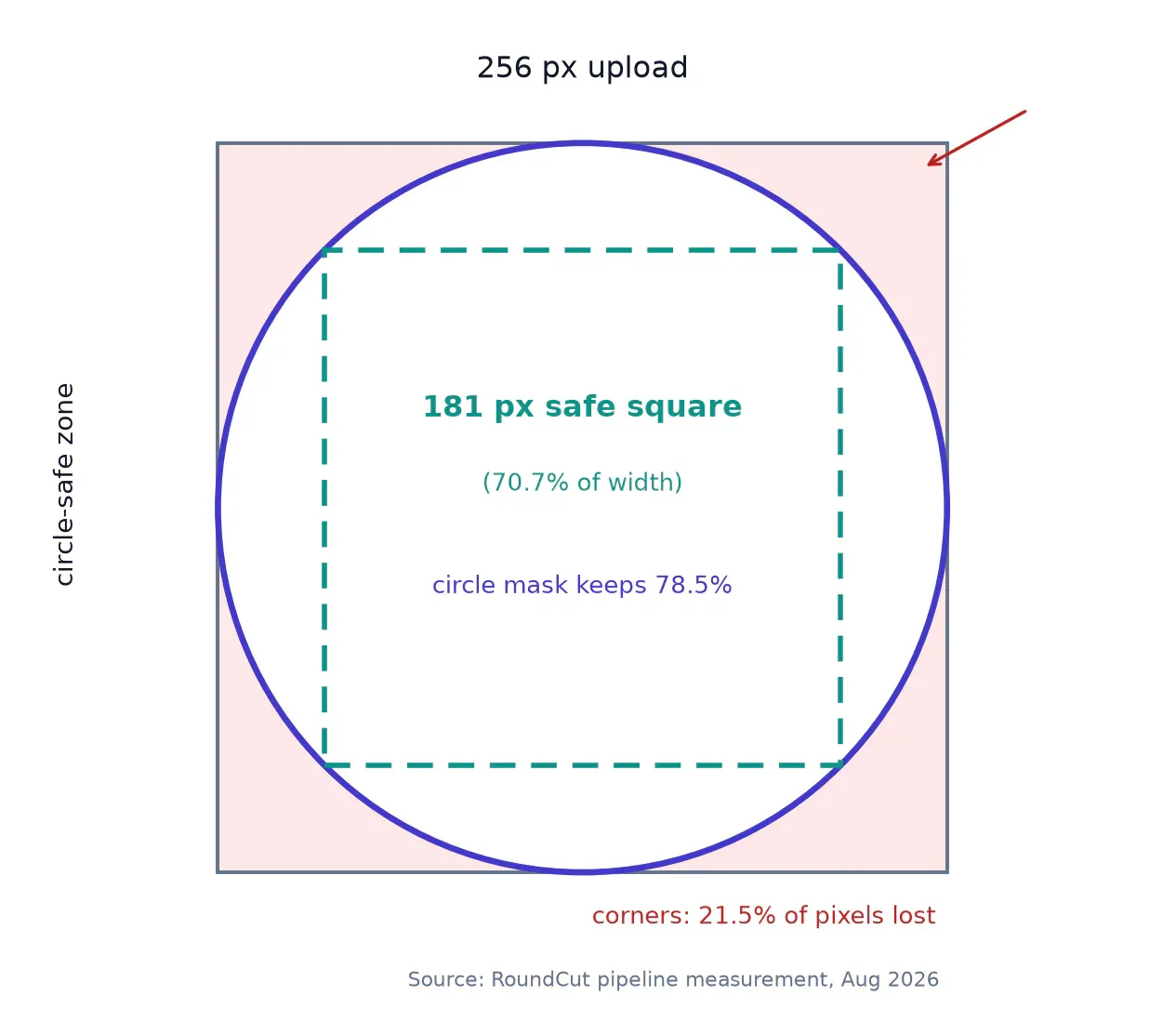
Marks and monograms deserve the tighter rule, and Discord taught us that lesson first; the Discord avatar cropping post walks through fitting a full logo inside the mask.
For photos, the older advice holds: build the square so the crop decision is already made. We covered the same square-first framing in this guide for GitHub avatars, and it transfers to Reddit unchanged.
Uploading it, and the crop step that isn’t there
On the desktop site, the path runs through settings:
- Click your profile icon in the top-right corner and open User Settings.
- Switch to the Profile tab.
- Find the “Avatar and banner image” section.
- Click the plus icon and pick your prepared square.
- The profile updates as soon as the upload finishes.
In the mobile app:
- Tap your profile icon, then My profile.
- Tap Edit on your profile page.
- Tap the pen icon below the avatar.
- Choose “Pick image” and select the file.
- Tap Add, then Save.
MakeUseOf’s current walkthrough documents no crop, zoom, or reposition step in either flow. Read that twice, because it’s the detail that makes preparation mandatory: the framing you upload is the framing Reddit keeps. There’s no second chance inside the dialog.
One vocabulary trap while you’re in there. Reddit splits “avatar” into two systems: the snoovatar, a dress-up version of the Snoo mascot you assemble from parts, and the uploaded profile picture this guide is about. Editing your snoovatar never touches your uploaded photo, and the reverse also holds.
FAQ: Reddit avatar specs
What size should a Reddit profile picture be?
A 512×512 square, exported as PNG or JPEG. Every current guide accepts 256×256 as the floor, and recommendations top out at “512 or larger,” so 512 satisfies all of them at once. Build it square yourself rather than letting the platform guess at a rectangle.
What is the file size limit for a Reddit avatar?
The published numbers conflict: 500 KB on one current spec guide, 5 MB on another. In practice a properly sized export never tests either ceiling. My measured 256-pixel exports landed between 23 KB and 144 KB depending on format, so staying under 500 KB takes no effort at all.
Why does my Reddit profile picture look blurry?
Usually the source, not the platform. A photo smaller than 256 pixels per side gives Reddit nothing to work with, and a non-square upload gets squeezed into a square slot. Start from the largest original you have, crop it square yourself, and export at 512 with the subject centered.
Can I use an animated avatar on Reddit?
Not as a custom upload; current guides list static PNG and JPG only. For the uploaded picture, keep one static 512 master and re-export it whenever a platform asks for a new size.
The spec numbers will drift again next year; the geometry won’t. A square master at 512 with the subject inside the middle 70 percent survives whichever cap Reddit enforces next quarter. The one thing no workflow rescues is a source photo smaller than the circle it lands in, because the comment row has already thrown away 98 percent of your pixels and it needed every one you could give it.


