Spotify Profile Picture: 750x750 and the Circle Tax
Spotify asks for a square avatar of at least 750x750, then masks it to a circle that discards 21% of it. I measured the files it really serves back.

Contents
- What Spotify accepts, and what it hands back
- Crop it square before Spotify sees it
- The circle tax: 21.48% of your square never renders
- 640, 320, 160: the three files Spotify serves
- Where a wordmark dies
- Artist profile and listener profile are two different uploads
- Questions people actually ask
- The file I’d actually upload
Upload a square JPEG or PNG at 750 x 750 or larger, under 20 MB, and keep everything that matters inside the middle 530 pixels. Spotify masks artist avatars into a circle and serves them back at 640, 320 or 160 pixels, so the corners of your square never reach a listener’s screen, and small text stops resolving well before it gets there.
What Spotify accepts, and what it hands back
Three floors and one ceiling. Spotify’s artist image guidelines publish the numbers you have to clear before the uploader stops arguing with you:
| Image | Minimum size | Formats | Weight cap |
|---|---|---|---|
| Artist avatar | 750 x 750 px | .jpeg, .png, .gif | 20 MB |
| Artist header | 2660 x 1140 px | .jpeg, .png, .gif | 20 MB |
| Gallery image | 690 x 500 px | .jpeg, .png, .gif | 20 MB |
Those are acceptance rules. They tell you nothing about display, which is the part that decides whether anyone recognizes you in a search result.
So I went and measured the display side. On 3 August 2026 I queried Spotify’s public oEmbed endpoint for five well-known artists, then downloaded the avatar files for two of them straight off the image CDN, no login involved, and ran identify on each file. Both avatars exist in three variants. The biggest is 640 pixels on its long edge, and for one of them that 640 file weighed 126,771 bytes, or 0.6% of the 20 MB the uploader will happily accept from you.
Put those two numbers side by side: the largest file Spotify hands the public is 110 pixels smaller than the minimum it demands on upload.
Crop it square before Spotify sees it
Native first, because it is free and already sitting in your pocket. On iPhone, open Photos, tap Edit, tap Crop, then use the aspect-ratio control and choose Square. Apple’s guide is explicit that the crop tool keeps the original aspect ratio of the photo when you drag a corner, so you unlock the ratio first, then pick the preset. On Android, Google Photos buries the same control under Edit, Crop, Aspect ratio, and the square is one tap in.
Both give you a clean 1:1 file. Neither shows you the circle.
That gap is the whole problem. You frame a portrait that looks balanced in a square, Spotify masks it, and suddenly the top of the head is clipped while there is dead air under the chin. If you want the same fix on a phone with the mask visible while you drag, I wrote up how to crop the circle on an iPhone in more detail.
The desktop route is worse. Spotify documents the listener flow as click your picture, choose the photo you want, click Save. That list has no crop stage at all. Whatever you pick goes live at whatever framing the app decides for you.
Which is why I’d rather see the circle while I am still deciding. Drop the file into RoundCut’s circle crop, drag until the mask sits where you want it, export a PNG or JPEG. It runs in the browser tab, so the photo never leaves your machine, and you are looking at the actual round result rather than guessing from a square. Canva and Photoroom will do the same job if you already pay for one of them, with an account and an upload as the price of entry.
The circle tax: 21.48% of your square never renders
Draw the biggest circle that fits inside a 750 x 750 canvas and count the pixels. I did, with Pillow, on a real mask: 441,660 pixels of 562,500 survive. The mask keeps 78.52% of your file (which sounds generous until you notice the corners are exactly where logos like to sit) and discards 21.48% of it.
The corners are where the money goes. A corner of the square sits 530.3 pixels from the center, and the mask’s edge sits at 375, so the corner point lands 155.3 pixels outside the circle. Anything you park there is decoration for you and nobody else.
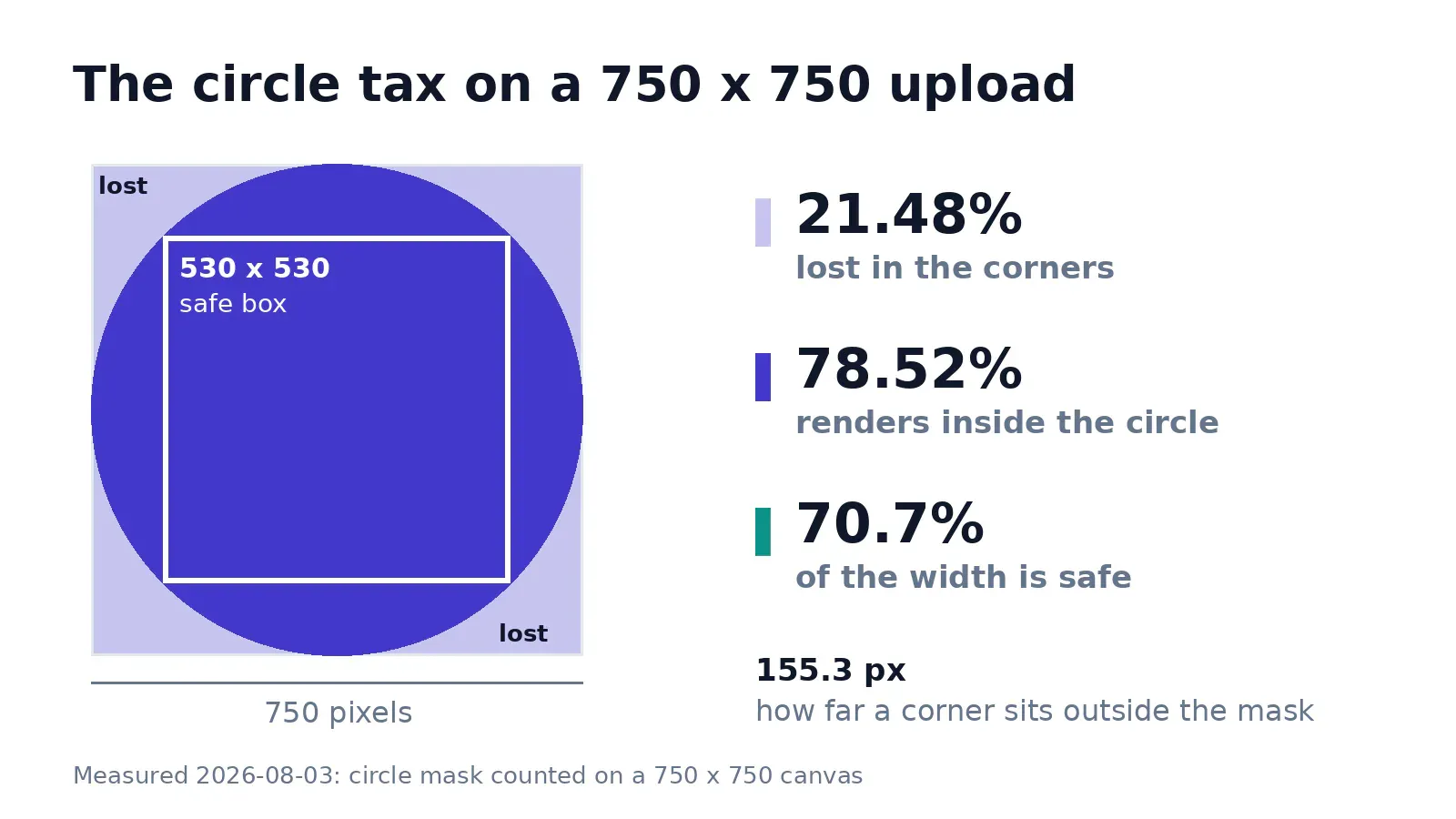
The number worth remembering is 530. That’s the largest square that fits completely inside the circle, 70.7% of the width, and it is the only region guaranteed to render on every surface. Face, mark, whatever carries the recognition, put it in that box and let the outer ring hold nothing but color.
This is the same discipline behind a square that survives the circle on a developer profile, which is why I fix the 1:1 frame before thinking about content.
If your source photo is landscape, crop to 1:1 with the subject already centered, instead of letting the platform pick the middle for you and hoping it agrees with your composition.
640, 320, 160: the three files Spotify serves
Here’s the measured ladder for a single artist avatar, pulled the same morning:
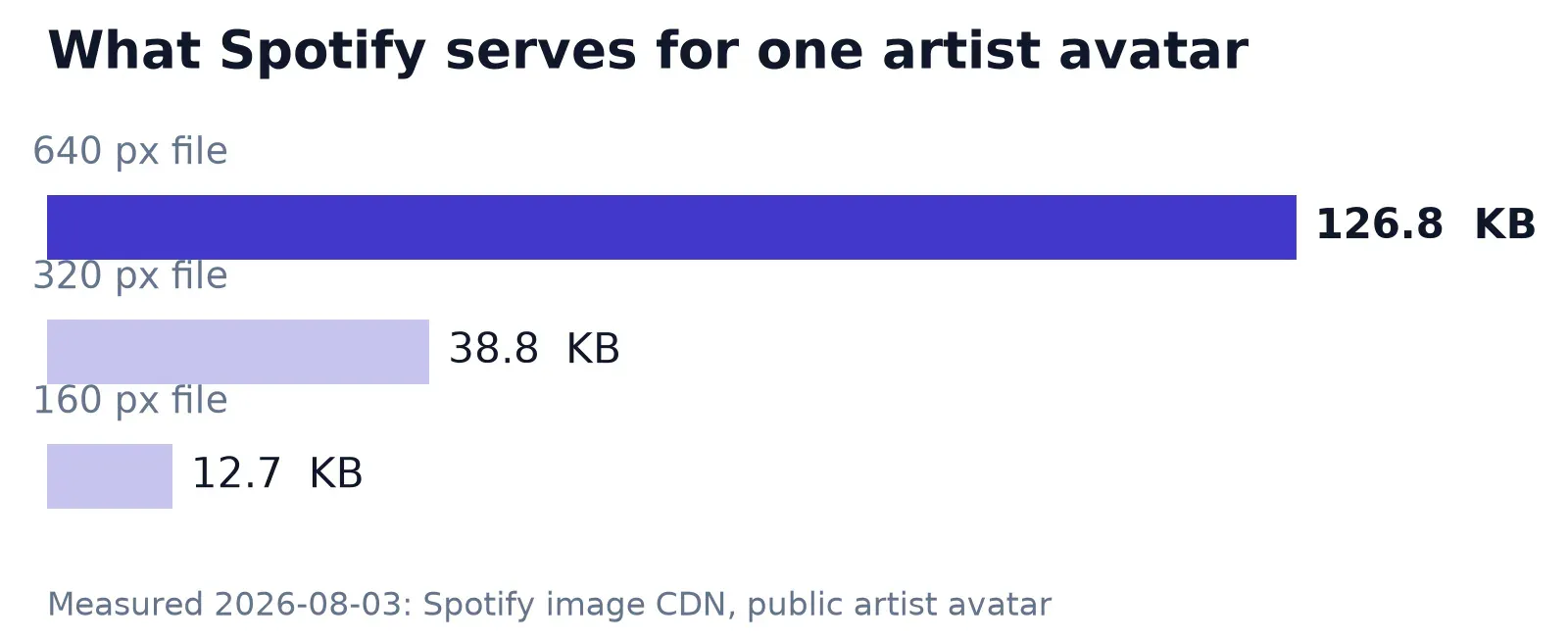
The 640 file came in at 126,771 bytes, the 320 at 38,789, the 160 at 12,740. Spotify’s public oEmbed endpoint returned the 320 variant for every one of the five artists I checked, without exception.
Then I loaded a public artist page in a headless Chromium at a 390-pixel-wide viewport and read the computed styles. The artist tiles render with border-radius: 50%, a true circle, in a 220 x 220 CSS pixel box, and the browser requested the 320 file to fill it. So on that surface your careful 750 upload arrives as a 320-pixel JPEG painted into a 220-pixel circle.
One more thing the CDN told me: it does not square your image for you. One of the two I downloaded came back as 538 x 640, portrait, at all three sizes. The file keeps whatever proportion you gave it and the crop happens later, in the client, dead center (which is harmless for a centered subject and brutal for anything else). Upload a rectangle and you have handed the framing decision to a mask you can’t see.
Now the advice everyone repeats: upload 1500 x 1500 for high-DPI screens. I can’t reproduce a benefit from it. The largest file I could get Spotify to serve is 640 wide, and a 750 source already covers that with room to spare. My honest position is upload 1500 anyway, because it costs you one export and it protects you the day Spotify introduces a bigger variant, but don’t expect it to sharpen anything this week. If your only usable file is 400 pixels wide, that is a different problem: run it through RoundCut Resize to hit 1500 x 1500 and you are just stretching pixels you never had.
Where a wordmark dies
Spotify’s own guidelines say don’t include text, advertising, or busy backgrounds. Fair, though it never says why, so I measured the why.
I built a 750 x 750 test avatar with the same word set at three cap heights, 60 px, 40 px and 24 px, then resampled it down the ladder with Lanczos. At the 160-pixel variant, 60 px becomes 12.8 px, 40 px becomes 8.5 px, and 24 px becomes 5.1 px. A 1-pixel hairline drawn on that canvas arrives at 0.21 px, which is another way of saying it stops existing.
Then I opened that 160 file and looked. Twelve-odd pixels of cap height still holds together fine. Down at 8.5 the strokes fatten and the letters start crowding their neighbours. At 5.1 the counters fill in, and what’s left has the rhythm of a word without being one.
For a band logo that means the mark travels and the name doesn’t. Strip the wordmark and scale the symbol until it fills most of that 530-pixel box. Musicians who use a lockup with the name under the mark are shipping two elements where only one survives the trip down. The same rule applies when you build a round logo with transparent edges: the visual weight has to live in the center, not in a tagline orbiting it.
Artist profile and listener profile are two different uploads
This trips up people who release music under their own account. The photo on your listening profile is not the photo on your artist page. They are separate uploads in separate places, and changing one leaves the other alone.
The artist avatar goes through Spotify for Artists, and Spotify’s own artist-image help says it appears at the top of your artist profile on the mobile app and in search results next to your name. Two details from that page are worth having in advance. First, if you never set an avatar, Spotify shows your most recent release’s artwork in both places instead, which is why so many small artists appear as an album cover in a circle. Second, the search image can take up to 72 hours to update, so the swap you make the night before a release may not be the one anyone sees on release day.
The header is a different animal entirely, 2660 x 1140 minimum, and it is what desktop, the web player and the Now Playing view on smart TVs show. You can’t update it from a mobile browser or the Spotify for Artists mobile app.
The listener picture is the loose one. Spotify publishes no dimensions and no format list for it, and the copyright warning is the only rule on that page. Treat it like every other round avatar you own and it behaves: square source, subject centered, exported around 1000 px. Consistency across platforms beats perfection on one of them, which is the same argument I made about a Bluesky avatar.
Questions people actually ask
What size should a Spotify profile picture be?
Square, at least 750 x 750 pixels for an artist avatar, as .jpeg, .png or .gif under 20 MB. Listener profiles have no published minimum, so match the artist spec and you are safe on both. Keep the subject inside the center 530 x 530 area of a 750-pixel file, because the circular mask discards the corners.
Why does my Spotify picture look blurry?
Two usual causes. The source was small before you uploaded, in which case nothing downstream fixes it and RoundCut Upscale 2x buys you a partial rescue at best. Or the detail you are after is fine text and thin strokes, which at 160 pixels have physically nowhere to land.
Does Spotify accept PNG with transparency?
PNG is on the accepted list, but a circular avatar sits on the app’s background either way, so alpha buys you nothing here and costs you bytes. Flatten it against the color you want and ship a JPEG. If you are keeping a transparent master for other uses, this guide covers shrinking one without breaking the alpha channel.
How long until my new picture shows up?
Up to 72 hours for the artist search image, per Spotify’s help page. The profile page itself usually flips much faster (which is what makes the lag easy to miss until a listener mentions the old one). On a listener account connected to Facebook, the docs warn it can take a few days, and logging out and back in is the documented nudge.
The file I’d actually upload
Prepping an avatar for a release tomorrow, I’d export at 1500 x 1500, put the face or the mark inside a 1060-pixel center box, which is the same 70.7% rule I use on a YouTube channel picture scaled up, and delete the wordmark rather than shrink it. Then I would upload three days early instead of the night before, because 72 hours is Spotify’s own number for the search image and release day is a terrible time to find that out.
One limitation I couldn’t close: my browser test ran at device pixel ratio 1. A retina phone may well request the 640 file for that same 220-pixel circle, which would make the case for a sharper source stronger than my numbers show. That is the one measurement here I would want a real handset for, and until someone runs it, the 1500 upload is insurance rather than proof.


