TikTok Profile Picture Size Guide 2026: The 98px Reality
TikTok renders your profile photo at 98x98 with a 66x66 safe zone. Upload 720x720, keep the subject inside 485 px, and pick the format by subject.

Contents
- Crop it inside TikTok first
- The square you hand TikTok
- Published TikTok profile picture sizes, side by side
- What actually survives at 98 pixels
- The 66-pixel safe zone on your own canvas
- Logos take more damage than faces
- When it still looks soft after upload
- Questions people actually ask
- What is the correct TikTok profile picture size?
- Does TikTok accept PNG profile pictures?
- Why does my TikTok profile picture look blurry?
Upload a 720 x 720 square and keep every part that matters inside a centered 485-pixel box. TikTok’s own ad documentation renders the profile photo at 98 x 98 pixels with a 66 x 66 safe zone, so the circle mask and the downscale, not your upload size, decide what people actually see in the feed.
Crop it inside TikTok first
The app already has a cropper, and for a phone headshot the built-in one does the job. Open your profile, tap Edit Profile, tap Change Photo, then pick between the camera and your gallery. You get zoom and pan over a round preview, plus an Undo if you overshoot. MakeUseOf’s walkthrough of that flow also documents the desktop path, where the pen icon next to your current picture gives you zoom and nothing else, and where profile videos never appear at all.
Two limits show up fast. You can’t type a pixel dimension, so whatever the app hands the server is whatever your pinch gesture landed on (the app never offers a numeric field). Padding is the other one: if your logo runs to the edge of the file, zooming in only makes the problem worse, and zooming out stops at the frame you gave it.
The square you hand TikTok
Start with a real square before you open the app. iPhone Photos keeps a 1:1 preset behind the crop icon; the Windows Photos app buries the same option under Edit image. Both are free and already installed, and both stop at rectangular crops with no round preview, which is exactly the thing you need to judge.
That’s where a browser tool earns its place. A circle crop shows you the mask while you position the subject, so you’re deciding against the shape TikTok will actually apply. If your source is a 4000-pixel camera file, scale it to 720 px first with a proper resample rather than letting the upload pipeline guess.
Then pick a format by subject:
- A face: JPEG. Photographic gradients compress well and the artifacts land where nobody looks.
- A wordmark or icon: PNG. MDN’s format guide puts it plainly, that PNG is preferred “for more precise reproduction of source images, or when transparency is needed”, and warns that lossy encoders make “text or other shapes become fuzzy or unclear”.
Published TikTok profile picture sizes, side by side
Search this topic and three different “recommended” numbers turn up within about four minutes. They are not contradicting each other by accident. They’re describing different things, and only one of them describes what a viewer sees.
| Number | Where it comes from | What it actually describes |
|---|---|---|
| 98 x 98 px | TikTok Ads Manager in-feed spec | the rendered profile box in the feed |
| 66 x 66 px | same spec | the safe zone inside that box |
| under 50 KB | same spec | file-weight ceiling for that placement |
| 200 x 200 px | Hootsuite’s July 2026 size guide | the figure most guides repeat |
| 720 x 720 px | SocialSizes | a larger recommended upload |
| 20 x 20 px | both guides above | the documented minimum upload |
TikTok’s in-feed ad spec is the only one of these published by TikTok, and it’s the one nobody quotes. It lists the profile photo as “98x98px, Square 1:1”, accepts .jpg, .jpeg and .png, caps the file at “less than 50 KB”, and adds the line that changes everything downstream: “the key element should be in the center of the 66px*66px-sized image to prevent it from being cropped.”
Hootsuite’s guide, updated in July 2026, still leads with 200 x 200 and a 20 x 20 minimum. SocialSizes says 720 x 720, on a page whose own update stamp reads July 9, 2021.
What actually survives at 98 pixels
Going from a 720-pixel upload to a 98-pixel render is a 7.3x reduction, and thin detail does not survive that in any recognizable form. I wanted the threshold rather than the adjective, so I rendered a 720 x 720 white card carrying black bars at 2, 4, 6, 8 and 12 pixels, downscaled it with Lanczos resampling to 98 x 98, and read the darkest pixel each bar left behind.
The 2-pixel bar came out at RGB 193, a pale grey against white, for a contrast ratio of 1.80:1. WCAG’s non-text contrast rule asks for at least 3:1 on “parts of graphics required to understand the content”, so that stroke is below the line where anyone is expected to perceive it. The 4-pixel bar reached 4.23:1, technically passing, but its darkest pixel was RGB 123, which is a smudge rather than a line. The 8-pixel bar was the first one to render as a full pixel (1.09 px) and hold 14.35:1. At 12 pixels the bar came back pure black.
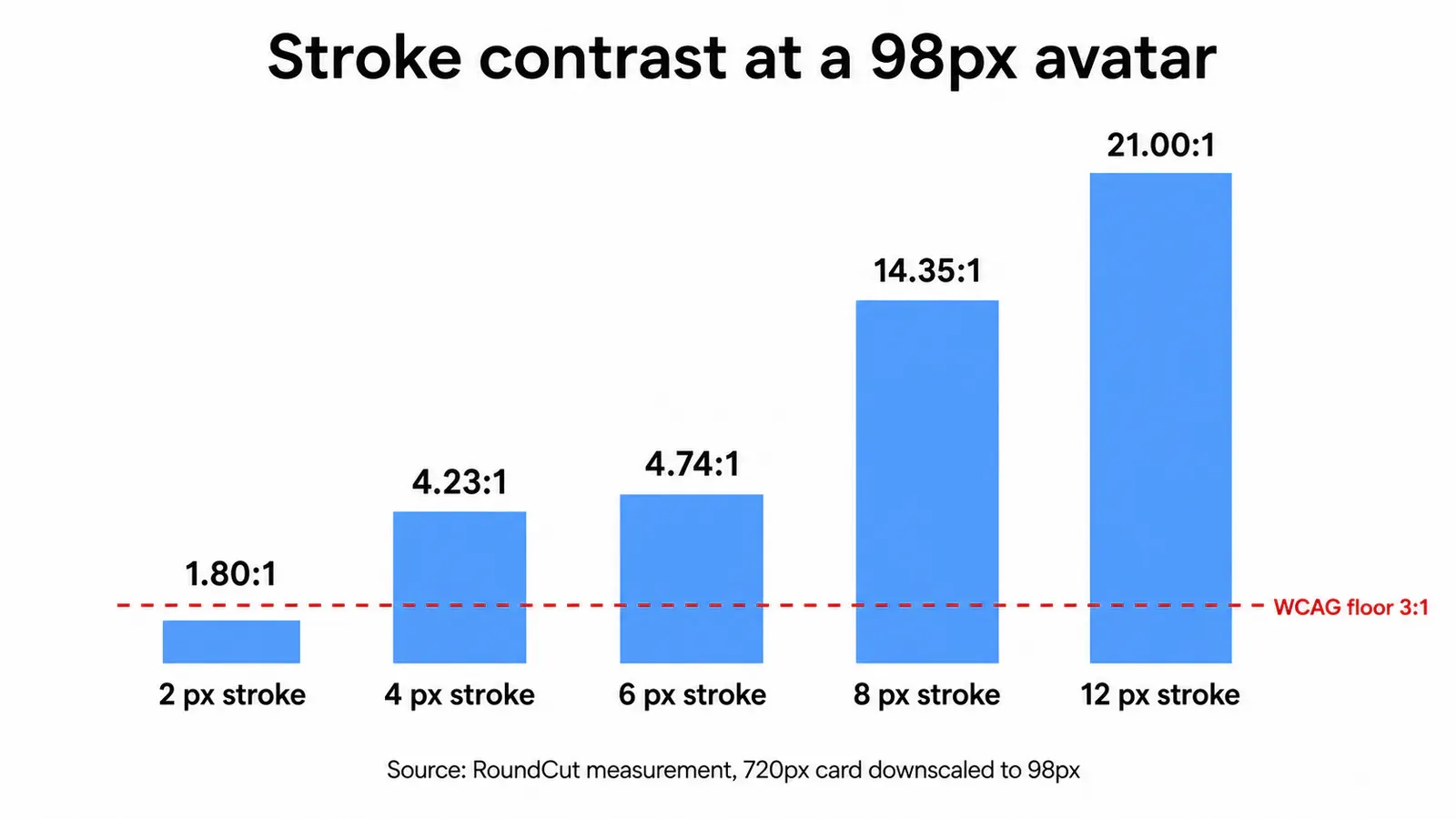
Designing to the 200-pixel number does not rescue the thin stroke either. At 200 x 200 the same 2-pixel bar reached 2.32:1, still under the floor.
So the rule you can apply without re-running any of this: a stroke needs to be at least 1.1% of your upload’s width to survive as a solid pixel. On a 720-pixel square the number is 8 pixels. On a 1080-pixel square it’s 12. Under that, the mark is decoration, and it will read as a grey haze in the comment thread.
The 66-pixel safe zone on your own canvas
TikTok’s safe zone is 66 of 98 pixels, or 67.3% of the width. Scaled up to a 720-pixel upload, that’s a live area of 485 x 485 pixels, with roughly 117 pixels of throwaway margin on each side (which is far more than most people leave). The circular mask takes its own cut before that: a circle inscribed in a square discards 21.5% of the area, and every one of those discarded pixels sits in the corners where people habitually park a logo.
Most circular-crop advice, including the 80% rule we use for LinkedIn headshots, is looser than TikTok’s own number. I split the difference by subject. For a face I still work to about 80%, because a portrait squeezed into 67% starts looking like a shrunken passport photo, and eyes and chin line are the features that need to reach the edges. For a mark or a monogram I hold the tighter 67%, since a logo that touches the boundary is the one that gets clipped when the avatar shows up in an unexpected placement.
If you want a worked example of the same arithmetic on a different platform, our notes on Bluesky’s circular safe zone run the numbers on a square source end to end.
Logos take more damage than faces
Faces degrade gracefully. Eyes blur into dark patches, a smile becomes a light band, and the thing still reads as a person at 98 pixels because our visual system is generous about faces. A logo has no such safety net, since its entire meaning lives in edges that measure two or three pixels after the downscale (which is exactly where the meaning was living).
Three practical moves, all of which the measurement supports. Thicken the strokes before export rather than after: scaling a delicate mark up does not add weight, it adds blur. Drop the wordmark and keep the symbol, since letterforms carry their meaning in strokes that sit far under the 8-pixel floor. And test on the shape, not the square, which is the whole argument behind keeping a logo inside the circle.
Export the mark on transparency if the platform will take it, then flatten deliberately instead of letting an encoder choose the backing color for you. We covered that trap in detail for transparent edges on a round logo.
When it still looks soft after upload
Check the obvious thing first: a profile video overrides the photo completely once you set one, so a photo you swapped last week may simply not be on screen. SocialSizes states it directly, that profile photos stop being visible on your profile once a profile video is set.
After that, assume re-encoding. Platforms store avatars as their own downscaled derivatives, which is the same mechanism behind a Telegram picture that turns fuzzy after it’s re-encoded copies. You can’t opt out of it, so the only lever you have is handing over a clean, already-square file that needs the least work.
The 50 KB ceiling in TikTok’s ad spec is a useful discipline even outside ads, because a file heavier than that is carrying detail a 98-pixel box will throw away. If your square won’t fit under it, resize first rather than pushing the quality slider into artifact territory. RoundCut Compress does that pass in the browser, which matters more than it sounds when the file is your own face.
Questions people actually ask
What is the correct TikTok profile picture size?
Upload a square of 720 x 720 pixels. TikTok’s published ad spec renders the profile photo at 98 x 98 pixels with a 66 x 66 pixel safe zone, and the widely repeated 200 x 200 figure is a recommendation, not the render box. Anything above 720 gets discarded on the way down.
Does TikTok accept PNG profile pictures?
Yes. TikTok’s in-feed ad documentation lists .jpg, .jpeg and .png as accepted formats for the profile image. Use PNG when your avatar is a logo, monogram or icon with hard edges, and JPEG when the subject is a photograph of a person, where lossy compression costs you nothing visible.
Why does my TikTok profile picture look blurry?
Three usual causes. The source was smaller than the render box and got upscaled, the subject sat outside the 66 x 66 safe zone and got clipped, or fine strokes fell below the 3:1 contrast floor after the downscale. A 720-pixel square with an 8-pixel minimum stroke fixes all three.
Before you export, put a real square in front of you and check the strokes at the size they’ll be seen, not at the size you’re editing. If your mark measures under 8 pixels of stroke on a 720-pixel canvas, it is not going to make it to the feed, and no upload size will change that. Our walkthrough of a square source that survives the mask covers the same prep on a platform that stores avatars differently.


