Profile Picture Safe Zone Guide 2026: Six Masks, Measured
A circular avatar mask deletes 21.46% of your square upload. I read the rendered CSS on six public profile pages and measured what actually survives it.

Contents
- Square first, in the app on your phone
- The mask is CSS, not a crop
- What six profile pages actually render
- The 70.7 percent square
- Mastodon’s eight pixels
- The one-megabyte wall
- How big the upload should be
- Questions people ask
- Does every platform crop profile pictures into a circle?
- How much of my photo does a circular avatar actually cut?
- Why does my profile picture upload keep failing?
- Should I upload a square or a circular PNG with transparency?
- The part I couldn’t measure
A profile picture safe zone is the part of your square upload that no platform mask can eat. A circular mask removes 21.46% of the square, and the largest square that survives inside the circle measures 70.7% of the side. Keep both eyes, the chin line and any wordmark inside that center and one file will work across sites that crop very differently.
Square first, in the app on your phone
Get the file square before you think about masks. Apple documents the path on iPhone: open the photo, tap the edit button, tap the crop tool, then “tap the lock at the top-right corner of the photo to unlock the aspect ratio” and pick Square from the preset row, which sits beside Wallpaper, 9:16 and 5:7.
The drawback is the shape of the preview. You frame against four straight edges, the platform draws a round one, and nothing in the Photos interface hints at the difference. Desktop is worse. Apple’s Preview steps stop at a rectangular selection and a Crop button, with no ratio preset and no pixel readout in the documented flow, so a square there is an eyeball estimate. If you want the full mobile walkthrough, our guide on how to crop a circle on the iPhone covers the framing part.
The mask is CSS, not a crop
No platform edits your file when it rounds your avatar. It draws your image into a box and clips the box, which is why the same upload looks different on two sites. The radius is a percentage of that box, as MDN’s border-radius reference puts it, resolved against the box’s own width and height rather than against your image. Feed a square box a 50% radius, the four corners round until they meet, and you have a circle.
That distinction matters for a practical reason. Since the mask lives on the box and not on the pixels, your original corners still exist in the file, still upload, still count against the size limit, and still show up the day a platform redesigns to a softer shape. You aren’t cropping for today’s mask. You’re cropping for the worst mask in the set, which is the circle, and the way to do that is a circle crop preview before you upload rather than after somebody tells you your logo lost its edge.
What six profile pages actually render
I opened six public profile pages in headless Chromium on 2026-08-06, no login, desktop viewport, and read three things for the largest square image on each: the file the server sent, the box the browser drew it in, and the first non-zero border-radius walking up from the image through its ancestors.
| Platform | File the server sent | Box it’s drawn in | Mask measured |
|---|---|---|---|
| GitHub | 460 × 460 | 256 px | circle (radius 50%) |
| Bluesky | 1000 × 1000 | 90 px | circle (45 px on a 90 px box) |
| YouTube | 120 × 120 | 120 px | circle (radius 50%) |
| DEV | 320 × 320 | 112 px | circle (radius 100%) |
| Mastodon | 400 × 400 | 80 px | rounded square (8 px on an 80 px box) |
| Steam | 184 × 184 | 164 px | square, no radius found |
Four circles, one rounded square, one hard square. The genre assumption that a profile picture is always a circle held for two thirds of the sample and failed twice, and it failed on the two platforms where a logo avatar is most common. GitHub’s version of the problem gets a full walkthrough in this guide.
The delivery side was messier than the mask side. GitHub’s header requests the avatar with ?s=64 and the profile page pulls a 460 px copy for a 256 px box. YouTube’s URL carries =s120-c-k-c0 and lands exactly on the 120 px it draws. DEV’s CDN string reads width=320,height=320,fit=cover,gravity=auto, meaning the platform picks the crop center for you with automatic gravity, which is fine on a centered headshot and unpredictable on a mark with an offset. Bluesky sent a 1000 × 1000 file into a 90 px box, which is eleven times the linear size the page needed, and it’s the same file the mobile app pulls at larger sizes, so the waste buys something. We covered Bluesky’s avatar separately when the platform’s own numbers stopped matching what it served. Google’s own sizing guidance for the web says to “resize the image to match the size that it is displayed at”, which is right for a page asset and wrong for an avatar you upload once and never revisit.
The 70.7 percent square
Run the geometry and the numbers are not close. A circular mask on a square keeps π/4 of the area, so 21.46% of what you uploaded is gone. Inside that circle the largest square you can fit has a side of 70.7% of the original, which is the real safe box for anything rectangular: a wordmark, a pair of glasses, a chin line, a horizontal logotype.
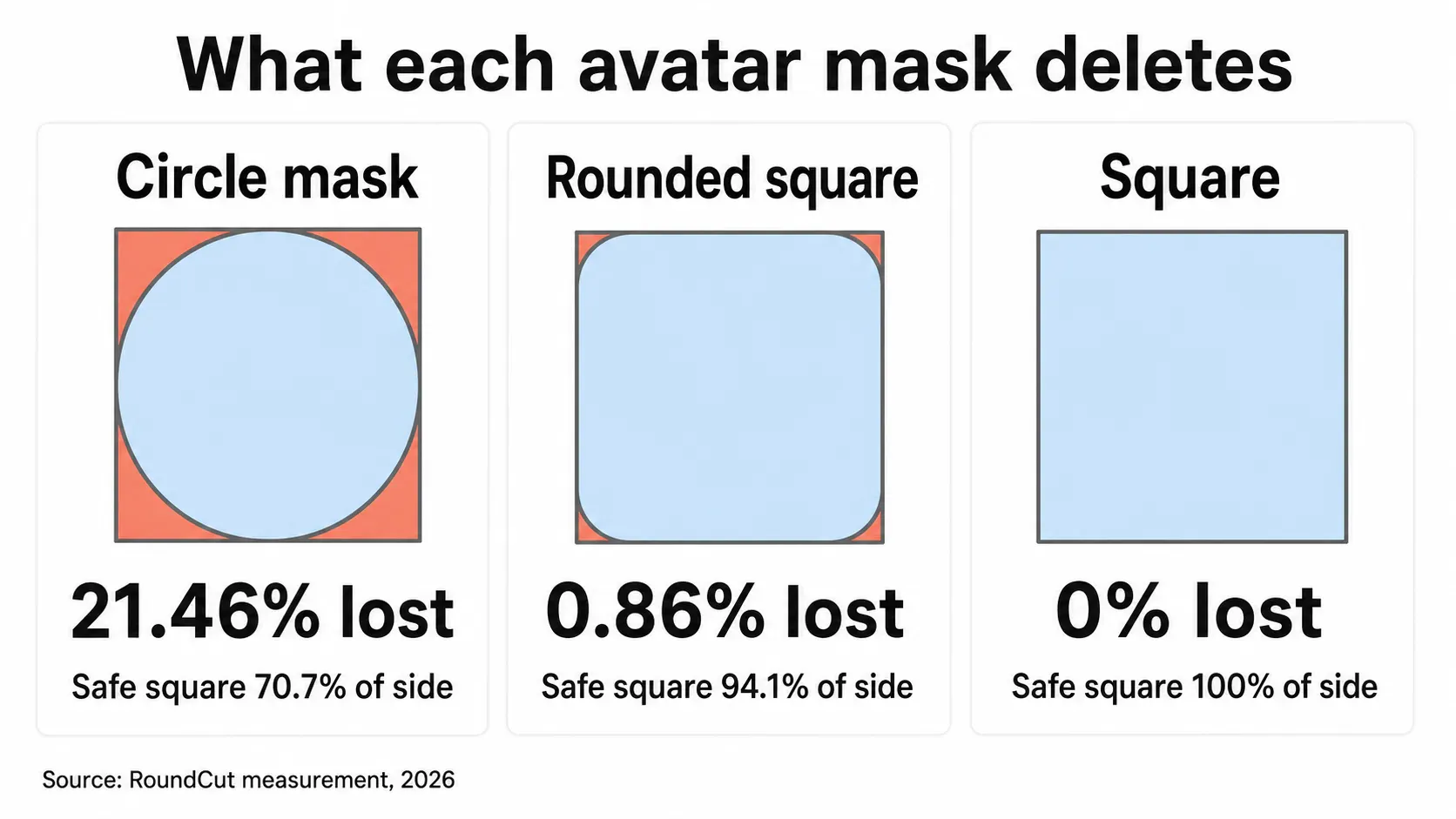
The 80% safe-area rule we’ve published before, including in the 80 percent safe area framing for professional headshots, is a working heuristic and it holds for faces, because a face is roughly round and tucks into a circle better than a rectangle does. For a horizontal mark it’s too generous. A logotype that fills 80% of the width touches the circle’s edge exactly where the curve is steepest, and the first and last letters lose their outer strokes. Our post on how to keep a logo inside the circle shows what that looks like at avatar scale. Use 80% for faces, 70% for anything with straight edges, and stop treating one number as the answer to both.
Mastodon’s eight pixels
Mastodon clips with an 8 px radius on an 80 px box, which is 10% of the side, and that mask discards 0.86% of the square. Practically nothing. A wordmark that dies on GitHub survives here intact, corners and all, and a design decision that looks minor in a CSS file changes what you should upload.
What Mastodon documents is the file side only: an avatar can be “a WEBP, PNG, GIF, or JPG image up to 2MB in size” and “this image will be downscaled to 400x400”. The shape is never mentioned in the docs. Steam is the other end of the range, with no radius anywhere in eight ancestor elements, so a 184 px square arrives on screen as a square. Neither platform tells you this, and both facts are visible in ten seconds if you open the page and read the computed style.
The one-megabyte wall
Here’s the part that turns a design problem into a failed upload. GitHub’s profile reference sets a hard ceiling: the picture “must be less than 1 MB in size”, under 3000 by 3000 pixels, PNG, JPG or GIF, with about 500 by 500 recommended for quality. Bluesky is stricter and more explicit, because the cap isn’t in a help article at all. The app.bsky.actor.profile lexicon, the schema the server validates against, accepts only image/png and image/jpeg and sets the avatar blob maxSize to 1,000,000 bytes.
So I measured what a square avatar actually weighs. Three detailed 1024 px portrait renders from our own library, center-cropped, resampled with Lanczos, exported at two sizes in three formats:
| Export | PNG | JPEG q85 | WebP q80 |
|---|---|---|---|
| 400 × 400 | 172–254 KB | 23–30 KB | 13–18 KB |
| 1000 × 1000 | 1051–1510 KB | 115–157 KB | 57–84 KB |
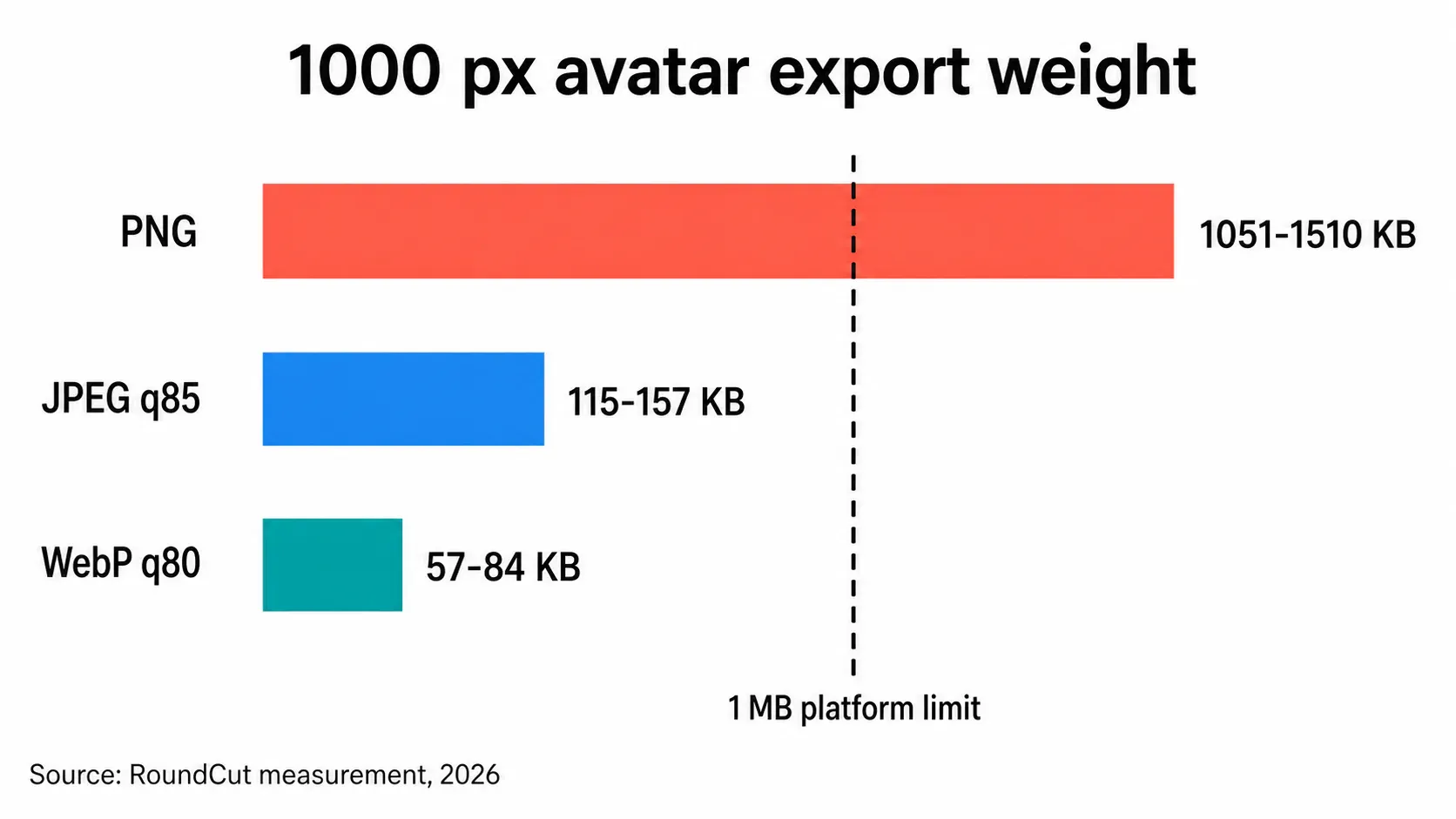
Every one of the three 1000 px PNGs broke the 1 MB rule, the heaviest at 1.47 MB, while the same crops as JPEG q85 came in between 115 KB and 157 KB. The habit of exporting PNG “because it’s lossless” is what produces the upload error people blame on the platform. PNG earns its weight when you need transparency or when the image is flat graphics with few colors, where it often beats JPEG outright. A detailed portrait is the opposite case. Save it as JPEG, or use WebP where the platform takes it, and if you’re stuck over a limit our guide on getting a photo under 1 MB walks the resize-then-quality order, or you can run it through RoundCut Compress and watch the byte count before the file leaves your machine.
How big the upload should be
Match the file to the largest box any platform in your set will draw, then stop. In this sample that box was GitHub’s 256 px profile header, so a 500 px upload covers it at just under 2× density, and 500 px is also what GitHub recommends. That’s my working number across the six: 500 px square, JPEG q85, which measured 23 to 30 KB at 400 px and roughly 115 to 157 KB at 1000 px, so a 500 px export sits comfortably under every ceiling here.
The exception is the platform that stores what you send and serves it back at app resolution later. Bluesky keeps a 1000 px copy even though the web profile only paints 90 px of it, so uploading at 500 px there costs you nothing today and costs you sharpness on a tablet tomorrow. Send 1000 px as JPEG to those, never as PNG, and when the original is bigger than the target, hand it to RoundCut Resize rather than shipping a 200 px file and hoping the upscaler on the other end is good. It usually isn’t.
Questions people ask
Does every platform crop profile pictures into a circle?
No. Of the six pages I measured, four rendered a true circle (GitHub, Bluesky, YouTube and DEV), Mastodon used a rounded square with an 8 px radius, and Steam applied no rounding at all. Design the crop for the circle anyway, since it’s the most aggressive mask in the set and a circle-safe image still looks right in a square.
How much of my photo does a circular avatar actually cut?
Exactly 21.46% of the area, since a circle inscribed in a square covers π/4 of it. The loss is all in the corners, so a centered face barely notices while a horizontal logotype loses its first and last characters. The largest fully safe square inside that circle has a side of 70.7% of the original.
Why does my profile picture upload keep failing?
Usually weight, not dimensions. GitHub caps the file under 1 MB and Bluesky’s schema caps the avatar blob at 1,000,000 bytes, and a 1000 px PNG portrait measured 1.03 to 1.47 MB in my test, over both. Re-export the same crop as JPEG at quality 85 and the file drops to roughly a tenth of that.
Should I upload a square or a circular PNG with transparency?
Square, in almost every case. The platform masks the box itself, so a transparent circular PNG buys you nothing on upload, costs you file size, and breaks the day the mask changes shape. Transparency earns its place in a logo file you control, not in an avatar the platform re-renders.
The part I couldn’t measure
Six pages, one desktop viewport, one afternoon. Mobile apps draw their own avatars in native code, so the CSS trick that read GitHub and Mastodon says nothing about what the iOS client does with the same file, and any platform can ship a redesign that moves the radius next quarter. The stable part is the geometry: a circle keeps 70.7% of the side no matter who applies it, and a file cropped to that survives a redesign in either direction. Check your own set the same way I did, right-click the avatar, inspect, read the computed border-radius, and you’ll know in a minute what a size guide can only guess at.
Then re-export the master at 500 px JPEG and keep it. The next time a platform asks for an avatar, you’re not hunting for the original.


