Profile Picture File Size Limits 2026: Why Uploads Fail
Profile picture upload failed? Five platforms publish three different ceilings, from GitHub's 1 MB to YouTube's 15 MB. One 512-pixel export clears them all.

Contents
- The three ceilings behind a rejected upload
- Start with the crop your phone already has
- What the five platforms actually publish
- One square, fifteen exports
- Resizing beats compressing
- GitHub’s 1 MB cap is the one that catches people
- The caps that aren’t measured in megabytes
- The 512-pixel default
- Questions that keep coming up
A profile picture upload fails for three different reasons: the file weighs more than the platform’s cap, the image sits outside its allowed pixel range, or the format is one it rejects. Those caps run from 1 MB on GitHub to 15 MB on YouTube. A 512 by 512 export, cropped square first, clears all of them.
The three ceilings behind a rejected upload
Most size guides publish one number per platform and stop there. That number is the file-size cap, and it’s the one everybody checks. Two other rules reject uploads just as hard and rarely make the guides:
- File size: measured in MB after export, and it varies by a factor of 15 across the platforms below.
- Pixel dimensions: a floor, a ceiling, or both. A tiny file at 4000 px wide still gets rejected where a dimension ceiling exists.
- Format: PNG, JPG and GIF are not interchangeable. LinkedIn refuses GIF outright, and YouTube takes a GIF only if nothing in it moves.
The order matters when you’re troubleshooting. Check dimensions first (which fixes the file size for free), because compressing a 4000-pixel square does nothing about a 1024-pixel ceiling.
Start with the crop your phone already has
Before any web tool, use the editor on the device holding the photo. On iPhone, open Photos, tap Edit, tap the crop icon, then pick Square from the aspect ratio row. On Android, Google Photos puts the same square preset under Crop. Windows users get it in Photos under Edit image, and on a Mac, Preview does it with a square marquee selection followed by Tools then Crop.
Doing the square crop on the device costs nothing and it fixes the most common rejection, which is a tall portrait photo fighting a square upload box. It also lets you see the subject at avatar scale before you commit, the same discipline behind an avatar crop that survives the circular mask.
Native croppers have one real weakness. None of them let you type an exact pixel target, so you end up with a 3024 by 3024 square weighing several megabytes, which is precisely the file that trips GitHub and Slack. Photos on iOS also re-encodes on export, so a screenshot saved twice picks up JPEG artifacts nobody asked for.
What the five platforms actually publish
I pulled these from each platform’s own help page rather than from a size-guide roundup, and the spread surprised me.
| Platform | File-size cap | Pixel rule | Formats |
|---|---|---|---|
| GitHub | Under 1 MB | Smaller than 3000 × 3000; ~500 × 500 recommended | PNG, JPG, GIF |
| 8 MB | 400 × 400 minimum, 7680 × 4320 maximum | PNG or JPG, no GIF | |
| Twitch | 10 MB | Not published | JPEG, PNG, GIF |
| YouTube | 15 MB | Renders at 98 × 98 | JPG, GIF, BMP, PNG, no animated GIF |
| Slack | Not published | 512 × 512 minimum, 1024 × 1024 maximum | Not published |
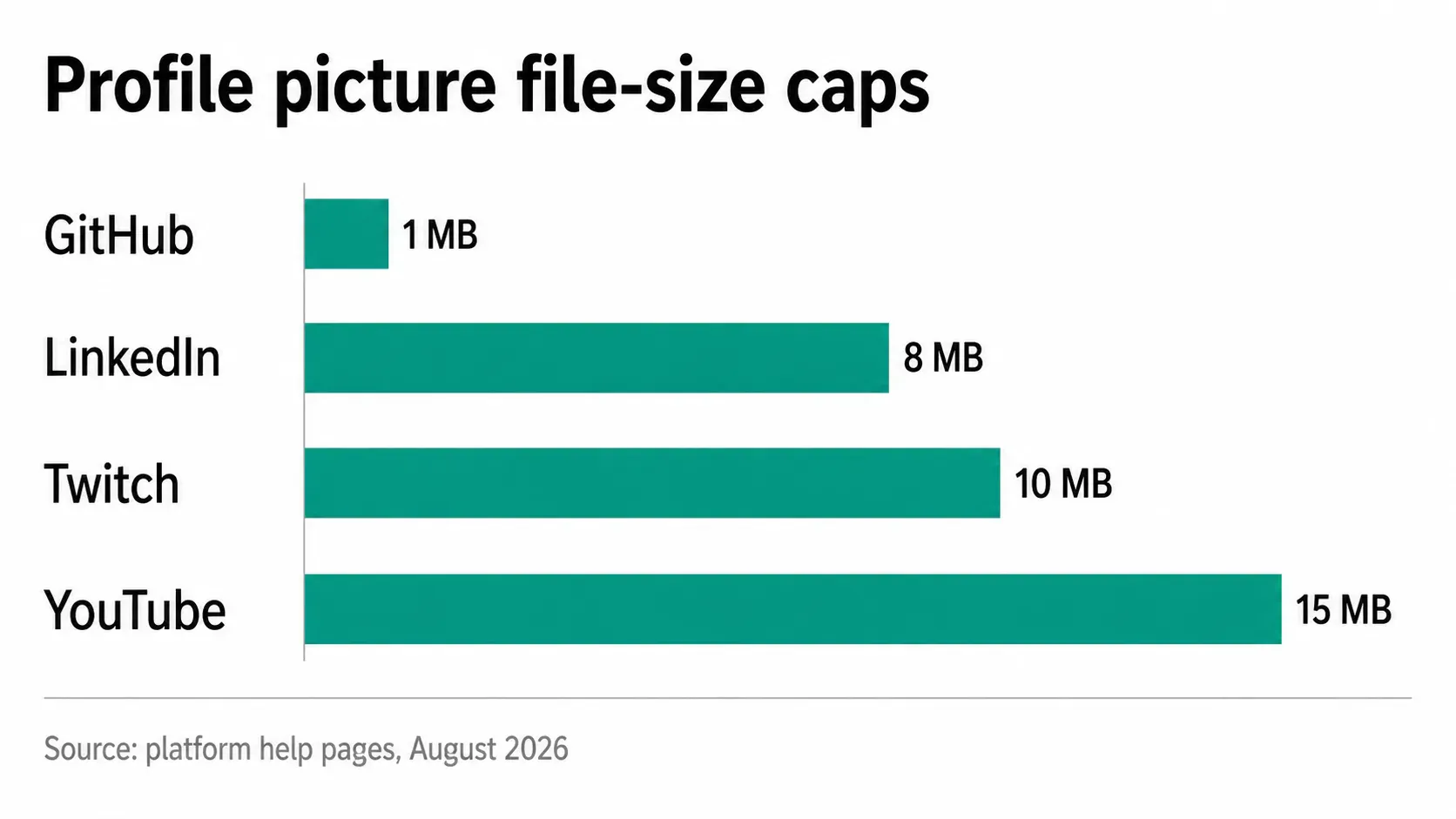
Fifteen times separates the tightest cap from the loosest, and the loosest one (which is also the most misquoted) is worth a second look. YouTube’s branding page says “Image size should not exceed 15 MB” for the profile picture, while size guides across the SERP still list 4 MB. Imagine.art’s YouTube guide, for one, prints “Max file size 4MB” in its spec table. The stale figure keeps circulating anyway.
The practical version of this table is short: crop to a square at whatever size your source allows, then set the long edge to 512 px. Everything after that is a rounding error.
One square, fifteen exports
To see where the megabytes actually come from, I ran a single photo through the whole export matrix today. Source file: 6000 × 4000 pixels, 2.68 MB as it came out of the library. I centre-cropped it to a 4000 × 4000 square, resized with Lanczos to four common avatar sizes, and encoded each one three ways.
The 4000-pixel square as a PNG came out at 11.60 MB. The same square as JPEG quality 85 came out at 1.77 MB. Drop the square to 512 × 512 and the PNG lands at 274.7 KB, the JPEG at 33.6 KB. That’s a 43× spread on one photograph with one crop, decided entirely by two export settings.
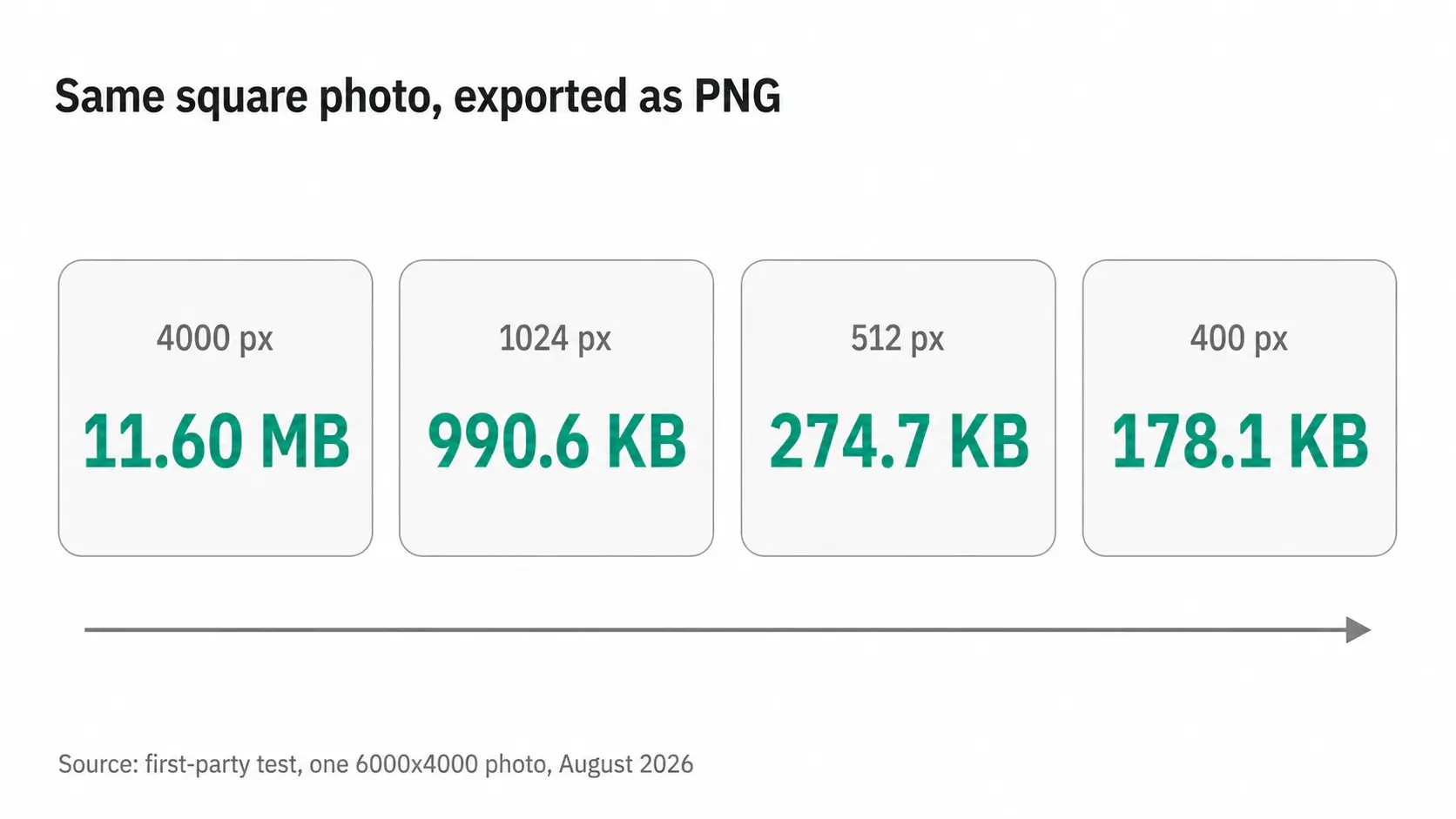
One number in that run deserves its own line. At 1024 × 1024, the PNG measured 990.6 KB, which clears GitHub’s 1 MB cap by about 33 KB. A slightly busier photo at the same dimensions goes over, which is why “it worked for my colleague” is such a common and useless data point in this particular failure.
If you want the file to land near a specific weight rather than near a specific width, the mechanics of hitting an exact KB target work the same way for avatars as they do for anything else.
Resizing beats compressing
LinkedIn’s troubleshooting page tells you to compress the photo if the upload fails. I’d flip the order. Compression re-encodes the same 16 million pixels. Resizing that square to 512 px throws away 98% of them (which is where the weight actually lives) before the encoder ever opens the file.
Run the numbers from that same test. Compressing the 4000-pixel square as hard as JPEG quality 85 allows gets you to 1.77 MB, still over GitHub’s limit. Resizing that square to 512 px and leaving it as a lossless PNG gets you to 274.7 KB, under every cap in the table, with no compression artifacts at all.
Compression earns its place on the second pass, after the resize, when you want a 512 px JPEG at 33 KB instead of a 512 px PNG at 275 KB. That’s where RoundCut Compress or any of the browser-based compressors earns its keep, buying you an 8× lighter file for a difference nobody sees at avatar scale.
GitHub’s 1 MB cap is the one that catches people
GitHub’s profile reference asks for a PNG, JPG or GIF “less than 1 MB in size” and “smaller than 3000 by 3000 pixels”, with about 500 by 500 recommended. That 1 MB is the tightest ceiling of any platform I checked, and it has aged badly enough to have its own complaint thread.
A thread on GitHub’s own community board, opened 21 June 2023 and still flagged urgent in its title, calls the cap unacceptable three years on. The first post is blunter than that: “It is 2026, and a 1 MB limit for a photo is simply unworkable.” Its supporting argument is the camera roll, where one frame runs anywhere from 4 MB to 20 MB.
Both sides have a point. Phone output really has outrun the cap, and a 1 MB budget for something GitHub renders at a few dozen pixels is generous rather than stingy. At 512 × 512, right next to the size GitHub recommends, my test photo is a 274.7 KB PNG with room to spare. The cap only bites when you upload the camera file untouched, or when you export a big transparent logo as PNG, which is its own problem to shrink a transparent PNG around.
The caps that aren’t measured in megabytes
Slack publishes no MB figure at all. What it publishes is a window: “Your profile picture should be a minimum of 512x512 pixels, but no larger than 1024x1024 pixels.” My 4000-pixel square is out of bounds there no matter what it weighs. Compression cannot save a file whose problem is geometry, which catches out anyone who assumes MB is the only currency. The full walkthrough for Slack avatars covers what that window does to a logo.
LinkedIn runs the same logic from the other end. LinkedIn’s help page puts the pixel size “between 400 (w) x 400 (h) pixels and 7680 (w) x 4320 (h) pixels”, with a maximum file size of 8 MB and a flat “We don’t support GIFs”. A 300 px crop off an old avatar fails there for being too small, and no amount of re-saving fixes it.
Two things follow from that. Never upscale a small avatar to clear a minimum, because the result reads soft at the exact display size the platform cares about, and always resize an image down from the largest square you have rather than up from a saved copy.
The 512-pixel default
My working default is a 512 × 512 square, exported as PNG for flat marks and JPEG quality 85 for faces. It sits inside Slack’s window, well under GitHub’s 1 MB at 274.7 KB, and above LinkedIn’s 400 px floor, with enough pixels left for a 2× display at the sizes these platforms render. One file, uploaded everywhere, no per-platform variants to keep track of.
The trade-off is real on two fronts. A 512 px master is thin for anything that later needs print, and platforms that store larger originals, like LinkedIn photo dimensions allow, will show a 1024 px upload slightly crisper on a retina laptop. My compromise: keep a 1024 px square in the folder as the master, export the 512 for everyday uploads, and reach for the master only where a platform accepts it and the display size justifies it.
Questions that keep coming up
Why does the same file upload fine on one site and fail on another?
Because each platform enforces a different ceiling, and they aren’t published in the same place. A 1.77 MB square passes LinkedIn’s 8 MB and Twitch’s 10 MB, fails GitHub’s 1 MB, and passes YouTube’s 15 MB. One file, four verdicts, none of them about quality.
PNG or JPEG for an avatar?
PNG for logos, wordless marks and anything with flat colour or transparency, since it stays lossless and the file is small once the square is 512 px. JPEG at quality 85 for photographs of people, where lossless costs you about 8× the bytes for a difference you can’t see at 98 px.
Does compressing a profile picture visibly hurt it?
At quality 85 on a 512 px square, the JPEG measured 33.6 KB against 274.7 KB for the lossless PNG, and at the 98 px YouTube renders there is nothing to see. Push the slider far lower and the loss is permanent once you save over the original, so compress a copy.
What if I only want one file for everything?
Export a 512 × 512 PNG. It clears every published cap in this article, satisfies Slack’s window and LinkedIn’s floor, and stays inside GitHub’s 3000-pixel dimension rule. For YouTube, where the picture renders at 98 × 98, the same file is already more than enough, and the channel picture guidance at 800 x 800 is about the crop, not the weight.
Two platforms are missing from the table on purpose. Discord’s and X’s help pages each answered my requests with a bot-challenge screen rather than a spec, so I have no published number to quote and won’t guess at one. If you need an avatar for either, upload the 512 square and watch what happens. At 274 KB it sits under any ceiling either of them is likely to be enforcing.


