Does AI Upscaling Add Detail? I Measured Three Methods
RoundCut's AI upscaler scored lower on PSNR and SSIM than plain bicubic in my test, yet looked sharper. Here is what three upscaling methods do to a real photo.

Contents
- The Test: One Photo, Three Upscalers
- What “Adding Detail” Actually Means
- Nearest Neighbor’s Sharpness Score Is a Trap
- Bicubic Wins the Numbers, Loses the Look
- RoundCut’s AI Upscaler Trades Accuracy for Perceived Sharpness
- Where an AI Upscaler Actually Earns Its Keep
- The One RoundCut Tool That Isn’t Client-Side
- The Honest Recommendation
No, not in the sense of recovering detail the camera missed. I downscaled a real photo, then rebuilt it three ways: nearest neighbor, bicubic, and RoundCut’s AI upscaler. The AI scored lower on pixel-for-pixel accuracy than plain bicubic, 24.32 dB against 28.98 dB, and still looked sharper up close. Here is the full data behind that contradiction.
Every phone gallery and every version of Preview already has a “make bigger” control, and it has had one for two decades. Drag a photo larger in Preview or Android Gallery and the app resamples the file: it takes the pixels you already have and estimates values in between. That is interpolation, and it is exactly what bicubic and nearest neighbor do in the test below. It cannot invent a stray hair or a fabric weave the camera never captured. An AI upscaler claims to do something different: look at the photo, recognize what a feather or a face or a weave typically looks like, and paint in texture that was never in the original file. Whether that trade is worth it is the whole question, so I ran the numbers instead of taking anyone’s word for it.
The Test: One Photo, Three Upscalers
I needed a photo where blur or blockiness would be obvious at a glance, so I pulled a public-domain macro shot of peacock feathers from Wikimedia Commons: thin barbs, hard color edges, the kind of texture a soft resize wrecks first. I cropped it to 1200x900 pixels and called that the ground truth. Then I shrank it to 600x450 with a high-quality downscale, the same style of resampling used to build before/after pairs in image-quality research, so the “before” would genuinely match the “after.”
That 600x450 file went through three separate rebuilds back to 1200x900. Nearest neighbor: every new pixel just copies its closest source pixel, no math involved. Bicubic: the resample built into Preview, Photoshop, and nearly every resize dialog you have used. And RoundCut’s AI Image Upscaler, the tool I would normally point you to before enlarging a low-resolution photo for print. Worth doing that check first regardless of which method you pick: a 400px thumbnail saved off a text thread will not gain real detail from any of the three, AI included.
Uploading to RoundCut took one click and no menus. It logged the job as a clean 2x, 600x450 in and 1200x900 out, and handed back a 478 KB WebP a few seconds later. No scale-factor dropdown to fiddle with; the product page explains why: it “tunes the enlargement on its own to deliver the best possible quality for each image you send.” Same file, three fates.
A couple of methodology notes, since the whole point of this test is that you should be able to check my work. Every intermediate file stayed in a lossless format until the very last step, so none of the three methods got a hidden advantage or penalty from JPEG artifacts baked into the low-resolution input. The downscale from 1200x900 to 600x450 used a high-quality filter, not a quick-and-dirty resize, so the low-resolution input lost detail smoothly instead of picking up the jagged aliasing a cheap downscale bakes in, and the “before” file stayed as clean as the “after” it gets compared against. And every candidate got resampled back to the exact same 1200x900 grid before scoring, so the fidelity numbers below are comparing like to like, not a bigger file against a smaller one.
What “Adding Detail” Actually Means
Interpolation and generation solve the same problem with opposite honesty. A bicubic or nearest-neighbor resize only ever touches pixels that already exist in your file. It can blend them, it can duplicate them, but it can never manufacture information nobody photographed. one breakdown of the difference puts it plainly: traditional methods “can only redistribute existing information. They don’t generate new detail.” An AI upscaler is trained on millions of image pairs and learns what a barb, a pore, or a weave typically resolves to at higher resolution, then paints a plausible version into your specific photo.
That is not the same claim as “restores the original.” RoundCut’s own upscaler page is upfront about the difference: the AI “does not bring back the original detail that was missing, it creates new detail that fits your image.” Fits is the operative word. It is a guess dressed as texture, tuned to look right rather than to be right, and that distinction is exactly what a fidelity metric like PSNR can catch even when your eye can’t.
Nearest Neighbor’s Sharpness Score Is a Trap
Run the numbers cold and nearest neighbor posts the highest edge-detail score of the three: 2,039.7, roughly six times bicubic’s. Look at the actual crop and the story flips. The eye of each feather, that blue-black core ringed in green, comes out staircased along every curve, and the fine barb lines turn into a mosaic of hard-edged blocks instead of hairlines. The scoring method (variance of the image’s edge map) cannot tell a genuinely sharp line from a jagged pixel boundary; both register as high-frequency energy. Not the same thing. A sharpness number with nothing else next to it is exactly this easy to fake, and nearest neighbor fakes it by accident, just by refusing to blend anything.
Bicubic Wins the Numbers, Loses the Look
Bicubic is the opposite failure. It posts the best PSNR (28.98 dB) and the best SSIM (0.9354) of the three, meaning it is, pixel for pixel, the closest match to what the camera actually recorded. It earns that by averaging: every new pixel is a weighted blend of its 16 nearest source pixels, which is a mathematically honest way to guess but a visually soft one. Under the loupe, the color blocking in each feather eye stays accurate (blue against black, green against tan) while the fine barbs blur into a haze, the classic soft-focus look anyone who has stretched a photo in Preview will recognize. Faithful, and a little mushy.
RoundCut’s AI Upscaler Trades Accuracy for Perceived Sharpness
Here is where the three-way test earns its keep. RoundCut’s AI file scored the lowest PSNR (24.32 dB) and lowest SSIM (0.8416) of the group, worse than plain bicubic on both counts that measure truth to the source. And it is the one of the three that, held next to the original at 100%, reads as genuinely sharp rather than soft or blocky: distinct barb lines, a crisper ring around each eye, none of the staircasing nearest neighbor left behind.
| Method | PSNR vs. original | SSIM vs. original | Edge-detail score |
|---|---|---|---|
| Nearest neighbor | 25.33 dB | 0.8814 | 2,039.7 |
| Bicubic | 28.98 dB | 0.9354 | 324.3 |
| RoundCut AI upscaler | 24.32 dB | 0.8416 | 885.7 |
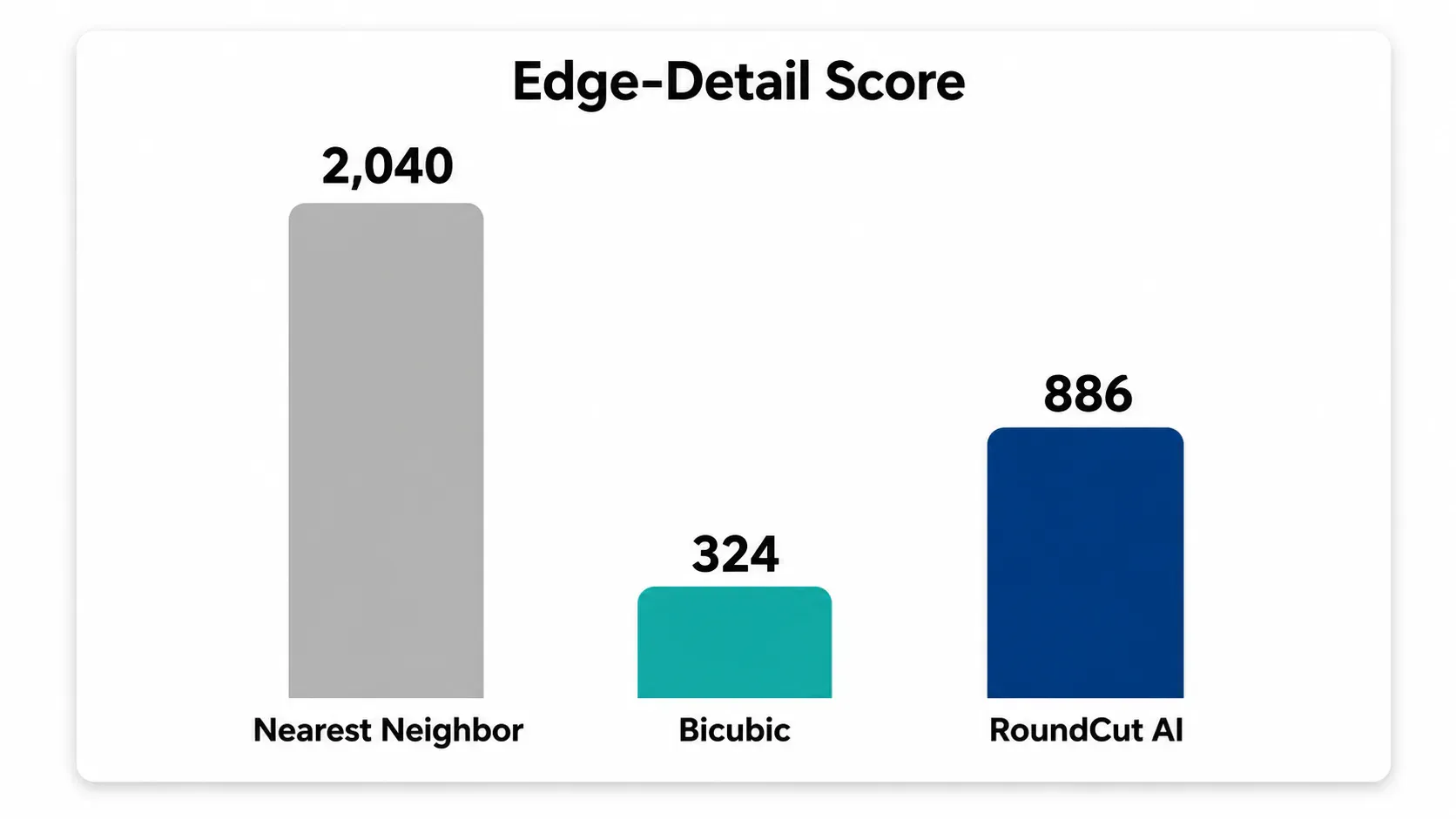
these metrics don’t always agree with your eyes: PSNR and SSIM are built to measure pixel-level and structural fidelity to a reference, not how pleasing a result looks, and the documentation for both is explicit that scores “do not always correlate with perceived quality.” An AI upscaler that invents plausible new texture will, by definition, drift from the ground truth it never saw in full resolution. The drift shows up as a PSNR and SSIM penalty even when the result reads as the sharpest file of the three. That is not a contradiction in my numbers. It is the entire mechanism, working as documented.
Where an AI Upscaler Actually Earns Its Keep
Small, old, or low-resolution source photos are where this pays off, not photos that were already large and clean. A product shot for an Etsy listing that got saved at 600px years ago, a LinkedIn headshot cropped too tight, a screenshot someone forwarded three times: those gain visibly from an AI rebuild because there is real ground to make up. A photo that is already sharp and large has almost nothing to improve, so an AI pass mostly just re-renders the same information with different noise.
Text is the one place to stay cautious. The same breakdown that explained the model’s approach also flags text directly: AI upscaling on text often produces artifacts, anything from slightly wrong letter shapes to blurred characters and hallucinated serifs. If your file is a scanned document or a screenshot full of UI copy rather than a photograph, skip the AI pass; text and screenshots blur differently than photographic detail, and inventing plausible-looking letters is worse than leaving real ones soft.
Order of operations matters after you upscale, too. A 1200x900 AI output is heavier than the 600x450 you started with, so if the destination is a web page rather than a print, resize an image online to the exact pixel size the page needs, then run it through RoundCut Compress before you ship it. That is the same discipline behind getting a file to 100 KB by resizing first, and free-tier ceilings vary enough between compressors that it is worth knowing RoundCut’s free-tier compressor test before you commit to one for a whole batch.
The One RoundCut Tool That Isn’t Client-Side
Worth knowing going in: this is the one tool on RoundCut that doesn’t run entirely in your browser. Compress and crop are canvas-and-WebAssembly jobs the tab handles alone; an AI upscale model is too heavy for that, so the file travels to a server and back. RoundCut’s own page says as much: “the work happens in the cloud, so even a modest phone can handle it.” If keeping a photo fully local matters to you, whether it’s a client’s product shot under embargo or just a habit, that is the real trade-off, not the marketing language around it. I have covered RoundCut’s local-only tools separately, and the upscaler is the one clear exception on this site.
The Honest Recommendation
None of the three methods is wrong, they are just tuned for different jobs. If the photo is heading to print or a wall, or you just need it to look good at arm’s length, the AI file is the one to keep: it wins the part a human actually notices. If you are feeding the output into something that will keep comparing it against a reference, archival scans, machine vision, another round of editing, bicubic’s extra 4.66 dB of PSNR is the more honest file, softness and all. Nearest neighbor has exactly one legitimate use left after this test: a fast, disposable preview while you are still deciding on a crop, never a file you actually ship.


